<?xml version="1.0" encoding="utf-8"?><?xml-stylesheet type="text/xsl" href="atom.xsl"?>
<feed xmlns="http://www.w3.org/2005/Atom">
    <id>https://just-electronic-x.vercel.app/blog/</id>
    <title>JustElectronicX Blog</title>
    <updated>2025-08-26T00:00:00.000Z</updated>
    <generator>https://github.com/jpmonette/feed</generator>
    <link rel="alternate" href="https://just-electronic-x.vercel.app/blog/"/>
    <subtitle>JustElectronicX Blog</subtitle>
    <icon>https://just-electronic-x.vercel.app/img/favicon.ico</icon>
    <entry>
        <title type="html"><![CDATA[Smart Weather Project]]></title>
        <id>https://just-electronic-x.vercel.app/blog/Smart Weather Project/</id>
        <link href="https://just-electronic-x.vercel.app/blog/Smart Weather Project/"/>
        <updated>2025-08-26T00:00:00.000Z</updated>
        <summary type="html"><![CDATA[I demonstrate how to build a simple Smart Weather Display using an ESP8266, BMP280 sensor, and a 128x32 OLED screen. The project uses I2C communication to read Temperature data from the BMP280 sensor and display it on the OLED.]]></summary>
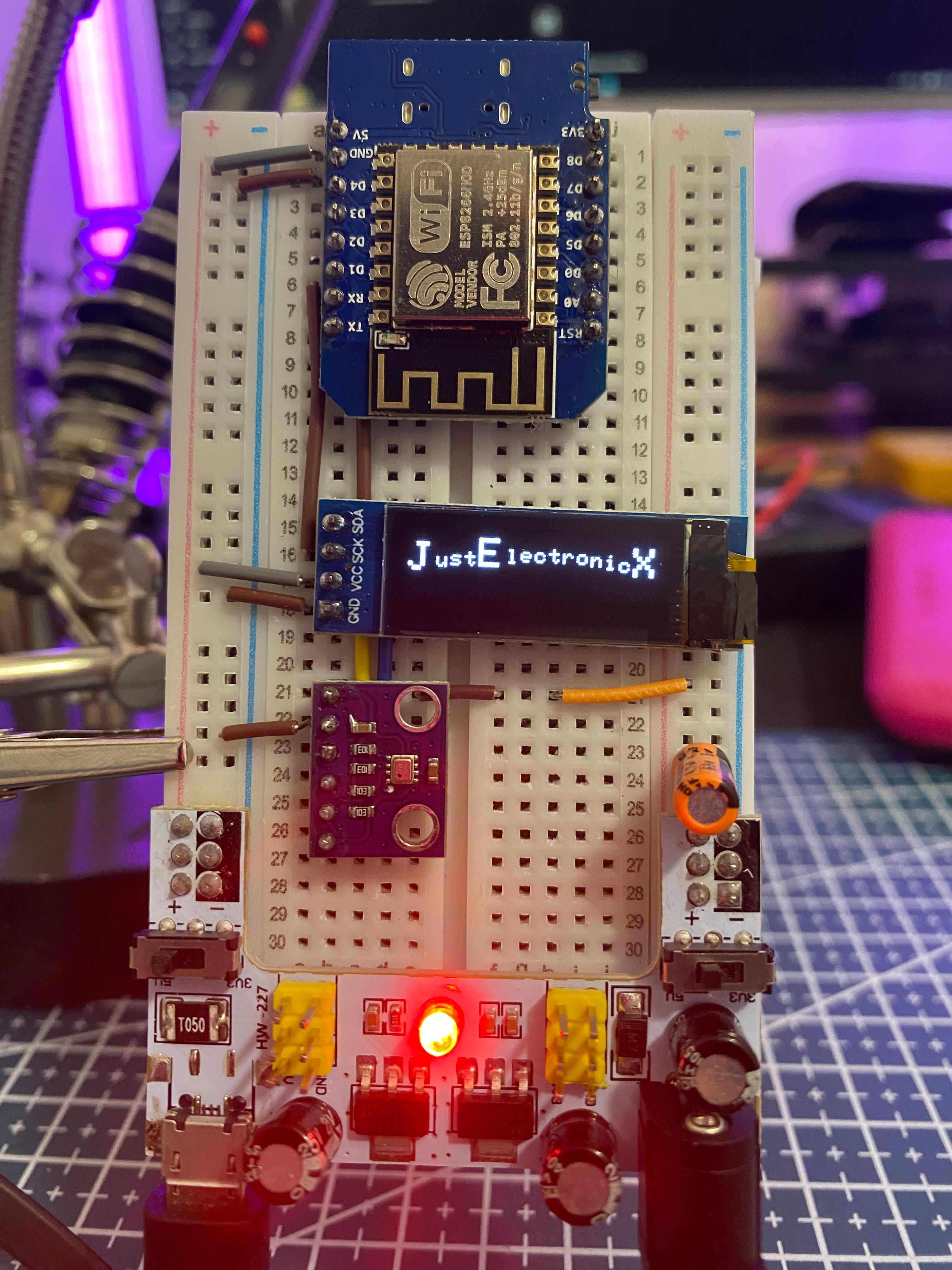
        <content type="html"><![CDATA[<p>I demonstrate how to build a simple Smart Weather Display using an ESP8266, BMP280 sensor, and a 128x32 OLED screen. The project uses I2C communication to read Temperature data from the BMP280 sensor and display it on the OLED.</p>
<p>You'll see the step-by-step connections, including:</p>
<ul>
<li class="">Wiring the BMP280 sensor and OLED to the ESP8266.</li>
<li class="">Powering the setup using a breadboard power supply.</li>
<li class="">Viewing the live Temperature readings on the OLED screen.</li>
</ul>
<div class="theme-admonition theme-admonition-warning admonition_xJq3 alert alert--warning"><div class="admonitionHeading_Gvgb"><span class="admonitionIcon_Rf37"><svg viewBox="0 0 16 16"><path fill-rule="evenodd" d="M8.893 1.5c-.183-.31-.52-.5-.887-.5s-.703.19-.886.5L.138 13.499a.98.98 0 0 0 0 1.001c.193.31.53.501.886.501h13.964c.367 0 .704-.19.877-.5a1.03 1.03 0 0 0 .01-1.002L8.893 1.5zm.133 11.497H6.987v-2.003h2.039v2.003zm0-3.004H6.987V5.987h2.039v4.006z"></path></svg></span>warning</div><div class="admonitionContent_BuS1"><p><strong>Important:</strong> This version of the BMP280 sensor requires 3.3V, so ensure correct wiring to avoid damage.</p></div></div>
<p>👉 <strong>Watch the Video from</strong> <a href="https://youtube.com/shorts/_0oJk6UgW9k" target="_blank" rel="noopener noreferrer" class="">here</a></p>
<p>👉 <strong>Download the Source Code from</strong> <a href="https://wokwi.com/projects/415643630537631745" target="_blank" rel="noopener noreferrer" class="">here</a></p>
<p>If you enjoyed this project or found it helpful, don't forget to like, comment, and subscribe to my <a href="https://www.youtube.com/@JustElectronicX" target="_blank" rel="noopener noreferrer" class="">YouTube Channel</a>. For more DIY electronics tutorials! 🚀</p>
<p><img decoding="async" loading="lazy" alt="Docusaurus Plushie" src="https://just-electronic-x.vercel.app/assets/images/P1_Weatherstation-908866f89b9f440e0952a0a6aac63a21.jpeg" width="3024" height="4032" class="img_ev3q"></p>
<hr>
<div></div>
<hr>
<div class="commentSection_q0zV"><div><h3>Leave a Comment</h3></div><form class="commentForm_zTbw"><textarea placeholder="Sign in to write a comment…" required="" rows="7" disabled="" style="resize:vertical"></textarea><button type="submit" disabled="">Post Comment</button></form><div class="commentsList_MSsY"><p class="noComments_x1Ls"><svg aria-hidden="true" focusable="false" data-prefix="fas" data-icon="comment-dots" class="svg-inline--fa fa-comment-dots " role="img" xmlns="http://www.w3.org/2000/svg" viewBox="0 0 512 512"><path fill="currentColor" d="M256 448c141.4 0 256-93.1 256-208S397.4 32 256 32S0 125.1 0 240c0 45.1 17.7 86.8 47.7 120.9c-1.9 24.5-11.4 46.3-21.4 62.9c-5.5 9.2-11.1 16.6-15.2 21.6c-2.1 2.5-3.7 4.4-4.9 5.7c-.6 .6-1 1.1-1.3 1.4l-.3 .3c0 0 0 0 0 0c0 0 0 0 0 0s0 0 0 0s0 0 0 0c-4.6 4.6-5.9 11.4-3.4 17.4c2.5 6 8.3 9.9 14.8 9.9c28.7 0 57.6-8.9 81.6-19.3c22.9-10 42.4-21.9 54.3-30.6c31.8 11.5 67 17.9 104.1 17.9zM128 208a32 32 0 1 1 0 64 32 32 0 1 1 0-64zm128 0a32 32 0 1 1 0 64 32 32 0 1 1 0-64zm96 32a32 32 0 1 1 64 0 32 32 0 1 1 -64 0z"></path></svg> No Comments yet.</p></div></div>]]></content>
        <author>
            <name>Dhaivat Joshi</name>
            <uri>https://dhaivatjoshi.github.io/Portfolio/</uri>
        </author>
        <category label="ESP8266" term="ESP8266"/>
        <category label="BMP280" term="BMP280"/>
        <category label="Smart Weather Station" term="Smart Weather Station"/>
    </entry>
</feed>